Read an LED panel spec sheet with a worked example. Match red and near-infrared wavelengths to the sample, its operating mode and the output test before ordering.
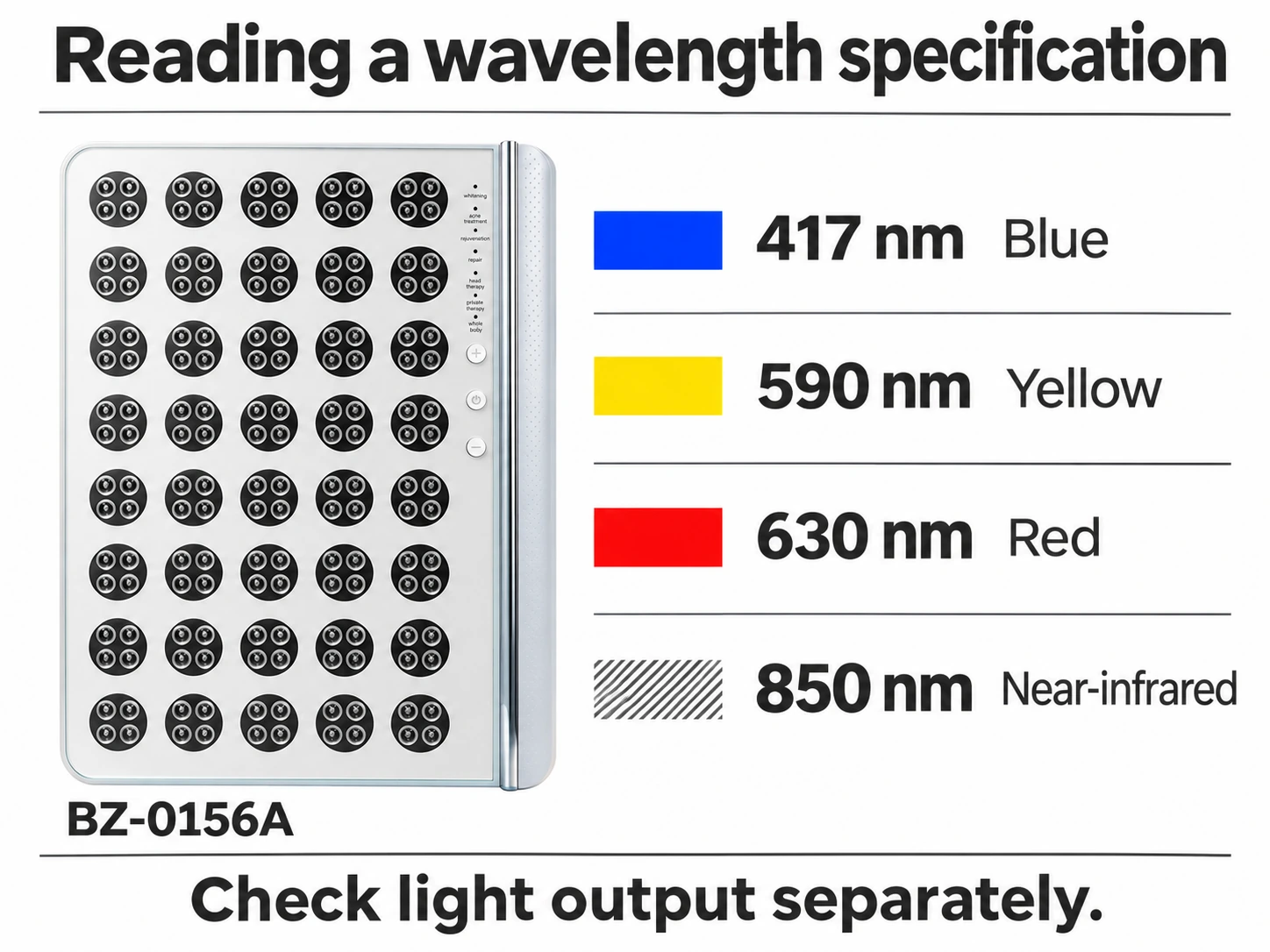
Catalogue wavelengths for the BZ-0156A panel. Output measurements depend on the sample, mode and test setup. AI-generated illustration based on the product photograph.
A supplier sends two PDFs for the same LED panel. The catalogue lists four wavelengths. The test sheet shows one output reading headed “red mode.” Can you use that reading in your product listing? First find out what “red mode” switches on. The answer determines which specification you can pass along to your packaging team.
What wavelength is red light therapy?
Different devices use different red wavelengths. Take a catalogue entry of 630 nm. The unit, nanometres, identifies the wavelength of the light. On the same sheet you might see 850 nm, which is near-infrared. A buyer comparing red light therapy wavelengths needs a separate entry for each and a note about which setting activates it.
Here is a concrete example. The BINZIM BZ-0156A panel specification lists 160 LEDs and four wavelengths: 417 nm blue, 590 nm yellow, 630 nm red and 850 nm near-infrared. You can copy those four entries into the design column of your buying sheet. Leave the measured-output column open until you have a reading for the sample and setting you plan to order.
Read the units before comparing two panels
Wavelength and irradiance answer different questions. Wavelength tells you which part of the spectrum the supplier specifies. Irradiance tells you the optical power reaching a given area at the measuring point. A technical report can also break that power down by wavelength interval. NIST explains that measurement in its introduction to spectral irradiance.
| What you see on the sheet | What to ask the supplier |
|---|---|
| A red wavelength in nm | Is this the catalogue specification or a measured peak for this sample? |
| A reading in mW/cm² | Which mode was on, where was the sensor placed, and how far was it from the panel? |
| A diagram of several test points | Which point does the quoted value come from? If it is an average, which points were included? |
| A sample ID on a report | Does this ID cover the controller and panel version in our quotation? |
Suppose one report gives a centre reading taken at the face of a panel and another gives an average across a grid farther away. Put the two results in separate rows. Ask both suppliers for the same measurement arrangement before you use those figures to shortlist a model. You can still compare dimensions, packaging or price while that question is open.
Red light vs near infrared on the sample in front of you
A photo can show the panel and its buttons. It cannot tell your buyer how much 850 nm light the sample emits. Ask for a simple mode map: one row for each selectable setting, the names shown on the controller, and the wavelengths the supplier says are active in that setting. Then match the report to one of those rows.
Go back to the two PDFs. If “red mode” runs red and near-infrared together, label the reading as a combined-mode result. If your project calls for a separate figure for the red channel, ask whether that figure is available. Dividing a total reading by the number of listed wavelengths would give your team an invented value.
Send one question your supplier can actually answer
Try this wording when you request the next sample: “We’re reviewing sample [ID] with controller [version]. Which wavelengths run in [setting]? Please identify the matching output record and tell us the test distance, sensor position and whether the figure is one reading or an average.”
File the response beside the sample photo and the dated quotation. Give each field one of three labels: listed on the specification, measured on our sample, or waiting for a reply. Put only the figures you can trace into the packaging brief. If the controller changes before production, reopen its mode row and have the supplier identify the records that still apply. The rest of the buying sheet stays useful.
Comparing more than one design? Pick the models you want to sample from the LED device range and use the same buying sheet for each one. That gives your product team a like-for-like starting point for the next supplier conversation.